 Trusted by musicians across Australia
Everything your band needs on stage and off — lyrics, chords, notation, stage lighting, video & billing — in one app.
Trusted by musicians across AustraliaEverything your band needs on stage and off — lyrics, chords, notation, stage lighting, video & billing — in one app.
Built by a working musician, for working musicians. It's Showtime handles the tech so you can focus on the music.

The master device is the conductor. Change songs, start the backing track, trigger the slideshow or visualiser — everything fires simultaneously across every connected device. Each musician turns their own pages independently with realistic page-curl animations, foot pedal, or swipe. The band just follows. No lag, no confusion.

Transpose any chart up or down with one tap — the new key persists per song. Or set an instrument mode across the whole setlist, so Eb, Bb, F and G players always read their own key automatically.


 Eb · Bb · F · G setlist transpose

Link videos or still images to any song — with cinematic transitions, Ken Burns zoom, and fade effects. Or let the built-in visualiser set the mood, pulsing and throbbing to the beat of the music in real time. This area is expanding significantly in the coming years.

Drive your stage lighting straight from the setlist. Attach a DMX lighting scene to any song and It's Showtime fires it the moment that song comes up — colours, washes and looks change with the music, no separate lighting operator needed. Because each scene is tied to its song, not a fixed timeline, you can skip a song, reorder on the fly or take a request on the night — and the right lighting still loads automatically. No rigid cue stack to fall apart, and none of the usual panic stations in the lighting booth when the band goes off-script. The master triggers the whole rig, in sync with the band.

Run open mic nights with ease. Manage guest performers, track the running order, and provide backing charts to walk-up artists — all from the same system your band already uses.

Just four buttons — up, down, left, right — that adapt to whatever's on screen.
In a list like your playlists or search results, up and down move through it, right opens the selected song or playlist, and left steps back out.
On the menu bar, left and right move across the toolbar buttons while up or down run the one you've landed on — so up and down turn the page by default (next and previous), and on the transpose control they shift the key up or down.
And Home is smart: tap down to jump straight back to where you were in the list, or up to start a fresh search — the box clears and the on-screen keyboard appears, ready to type.
Works with any Bluetooth foot pedal or keyboard, so your hands stay on the instrument and your eyes stay on the stage.

Add personal notes, cues, and reminders right where they're needed — pinned to specific parts of a song, with instrument-specific colour coding. Go further and drop in music notation, from a few bars to nail an exact riff all the way to full-page sheet music. And like everything in It's Showtime, the notation transposes with you — notes and key signature shift to match. Drag any annotation anywhere and it stays put.

Musicians join with a single QR code scan — no app install, no account. Every chart is instantly available on their device, in their key, synced to the master in real time.

Send colour-coded alerts to your sound engineer, lighting tech, or stage manager mid-show. They acknowledge with one tap — you see it confirmed instantly. No shouting across the stage.

One tap and every screen in the band goes pure black — before the show, through the interval, after the encore — so a row of glowing tablets never lights up a darkened stage. The master blanks the whole band at once; a tap on the black screen brings it straight back. The little touches that make you look like a proper production.

It's Showtime isn't just charts. Track every gig from enquiry to paid — fees, hours, agencies and per-member payment splits. Generate branded Australian tax invoices (GST & ABN) straight to the venue, email them in a click, then run year-end income and member-disbursement reports. Your setlists and your books, finally in one place. The feature that turns a chord app into the system that runs your band.

Import professional notation straight from Sibelius, MuseScore or Finale — as .musicxml or compressed .mxl — and It's Showtime renders it as clean, engraved sheet music on stage. Keep chord charts, PDF fakebook pages and the full score as arrangements of the same song, and switch between them in one tap. Ideal for schools, worship teams, orchestras and venues working from leased notation libraries.

Attach useful links to any song — YouTube tutorials, Spotify reference tracks, chord diagrams, backing track sites. Band members tap through to practice material straight from the chart screen, before and after the gig.
Attach audio files directly to a song. When the show starts, It's Showtime automatically routes the backing track to whichever device is nearest the mixing desk — no cables, no fuss. The sound engineer confirms their device as the audio output with one tap.

Interactive Circle of Fifths popup for quick key reference, chord relationships, and transposition guidance — right there on your performance screen when you need it.
Paste from Word, import RTF files, link PDF fakebook pages, or type directly. Your existing chord charts work perfectly — 3,000+ song libraries are no problem.
Organise songs into playlists for each gig. Drag to reorder on the night. Add pre-show images and intermission slides to each playlist.
It's Showtime runs on your laptop or Raspberry Pi. Band members connect via their phone or tablet browser — no app install, no accounts. You control, they follow.
Navigate with 4 buttons — foot pedal, keyboard, or touch. The roadie runs the projector from their phone. Everyone stays in sync. Focus on the music.
Go fully offline with your own gear, or let the cloud handle your library — your choice, and the two stay in sync both ways.
At the gig, a Cloud account still runs on your local Wi-Fi like Standalone for the band's screens — the cloud just holds your library & billing.
Start free, upgrade when you're ready. Every licence is perpetual — Pay once and the app is yours to keep. The price covers your free-update window (1 year on Band 2, 4, 6 & 8, 3 years on Band 12 · Pro); after that it keeps working on your current version and you can renew updates anytime.
| Try-It 2 up to 2 players Free | Band 2 up to 2 players $59 once | Band 4 up to 4 players $99/yr | Band 6 up to 6 players $124/yr | Band 8 up to 8 players $149/yr | Band 12 · Pro up to 12 players $499 / 3 yrs | |
|---|---|---|---|---|---|---|
| Connected playersMusicians on charts over Wi-Fi. Crew & roadies connect free and never use a slot. | 2 | 2 | 4 | 6 | 8 | 12 |
| Master / Slave syncOne device drives song changes & page turns; every screen follows in real time over Wi-Fi. Free — most apps don't have it. | ✓ | ✓ | ✓ | ✓ | ✓ | ✓ |
| SongsYour own song library | 25 20 yours + 5 demo |
✓ Unlimited |
✓ Unlimited |
✓ Unlimited |
✓ Unlimited |
✓ Unlimited |
| Setlists / playlists | 3 | ✓ Unlimited |
✓ Unlimited |
✓ Unlimited |
✓ Unlimited |
✓ Unlimited |
Full performance & show suite
|
✗ | ✓ | ✓ | ✓ | ✓ | ✓ |
| Gigs & invoicingTrack gigs, fees & member splits, GST, send branded tax invoices, run year-end reports | ✗ | ✓ | ✓ | ✓ | ✓ | ✓ |
| Multiple bandsRun more than one band from a single licence — separate libraries, setlists & invoices for each | ✗ | ✓ | ✓ | ✓ | ✓ | ✓ |
| Crew app & messagingSound, lighting, stage & roadies on their phones, with tap-to-acknowledge alerts — free on every plan | ✓ Free |
✓ | ✓ | ✓ | ✓ | ✓ |
Pro extras
|
✗ | ✗ | ✗ | ✗ | ✗ | ✓ |
| It's Showtime watermarkRemoved on any paid plan | Shown | ✓ Removed |
✓ Removed |
✓ Removed |
✓ Removed |
✓ Removed |
| Free updatesLicence is perpetual — this is how long updates are included; the app keeps working after | ✓ Always (Cloud) |
1 year | 1 year | 1 year | 1 year | 3 years |
| Support | Community | ✓ Priority |
✓ Priority |
✓ Priority |
✓ Priority |
✓ Priority |
| Start Free | Get Band 2 | Get Band 6 |
AI Assistant — highly recommended, and not a subscription.
The It's Showtime AI helper runs on your own Anthropic (Claude) account — you pay Anthropic directly, pay‑as‑you‑use at their standard rates, only for the questions you actually ask. No monthly fee, no lock‑in. It helps you learn the app, build setlists, tidy up charts, and answer "how do I…" on the spot.
It needs an API key with a little pre‑paid credit — not a Claude Pro/Max subscription from claude.ai. They're two different things, and Anthropic's setup can be confusing, so here are the exact links — two quick steps, then paste the key into It's Showtime:
① Get an API key →
·
② Top up credit →
A few dollars of credit lasts a very long time at the rate we use. (Claude itself is excellent — it's just the billing screens that are fiddly.)
Standard on every plan — including Free: HTML chord charts · Song metadata (key, BPM, time sig, notes) · Page-view modes · Mirror mode · Circle of Fifths reference · Master / Slave sync · QR-code band onboarding · Foot-pedal & keyboard navigation · Rehearsal & practice links
Every paid licence includes a Cloud (SaaS) subscription. You get both — the desktop app, perpetual and yours to keep (it works forever even after your free-update window ends), and the hosted Cloud (SaaS) version for the length of your licence: always on the latest version, run your whole show from anywhere with nothing to install. Renew to keep Cloud running and unlock new features — we'll remind you a month before it lapses so nothing stops mid-season. Your songs and media live on your own device (no storage caps); Cloud plans add hosted storage.
Trying it free? The Try-It 2 tier runs in the Cloud too — explore It's Showtime online with nothing to install. Free Cloud accounts are kept for 3 months; upgrade to any paid licence (Band 2 or above) to keep your Cloud library, otherwise it's removed after 3 months. The free desktop app keeps working regardless.
Schools, studios & large ensembles: running a class of 30, a choir, or any group bigger than Pro's 12? Contact us for a custom education / multi-seat key — we'll set you up directly.
On the roadmap — what's planned next
Real screenshots from live performances and rehearsals
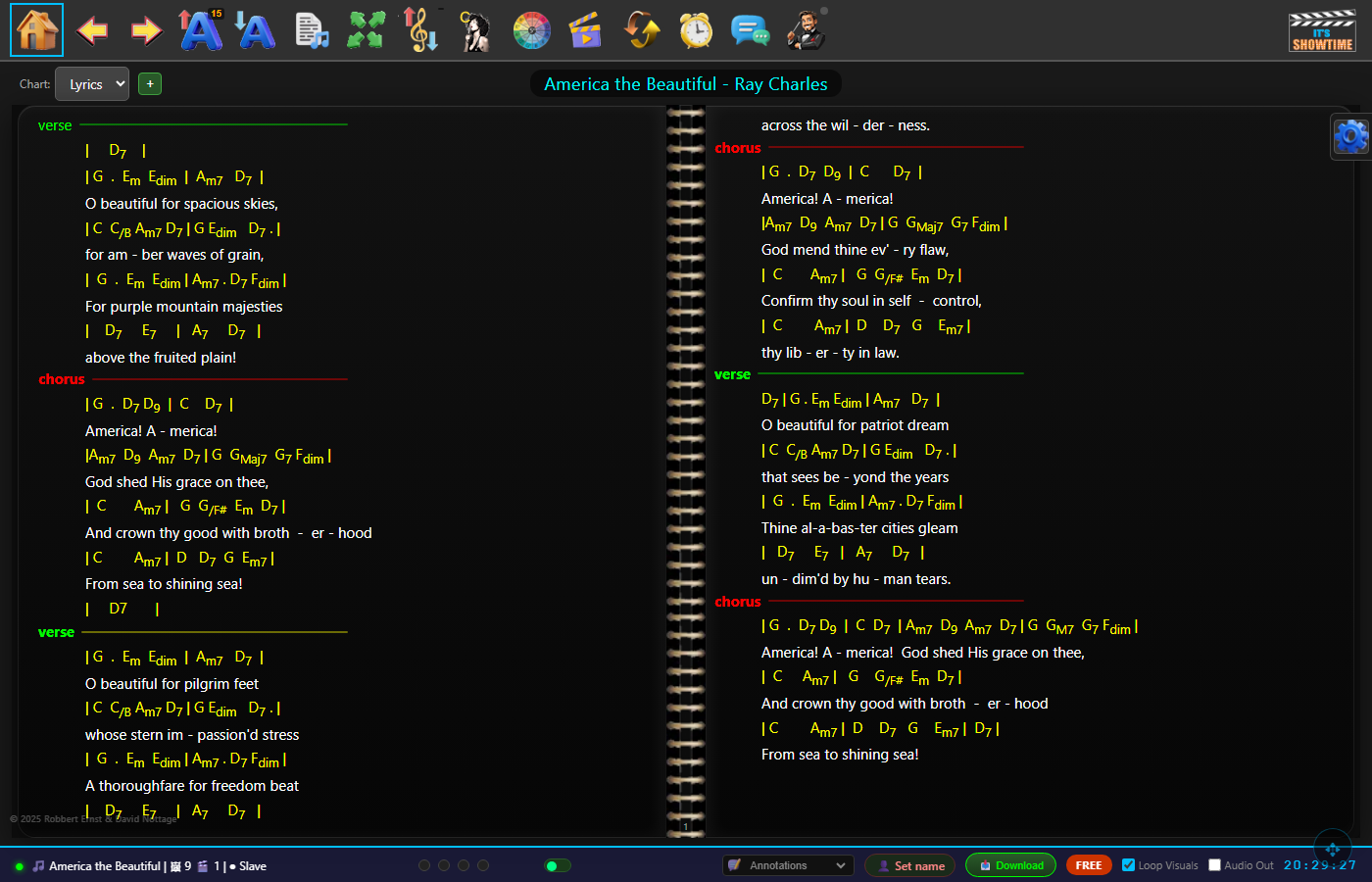
2-Page landscape view — full chord chart spread across the screen with lyrics, complete toolbar, and ring binder spine. Perfect for larger tablets and desktops.
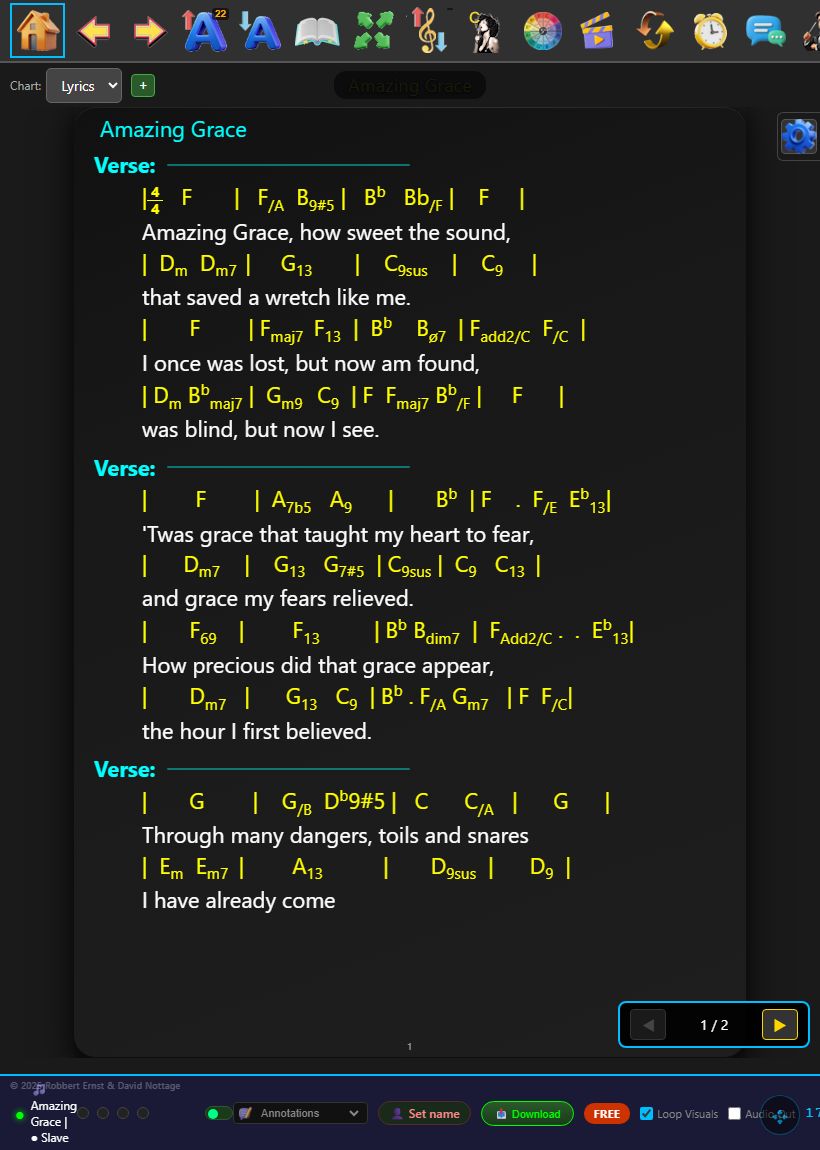
Portrait single-page view — optimised for phones and portrait tablets. Swipe or use foot pedal to turn pages with a smooth page-curl animation.
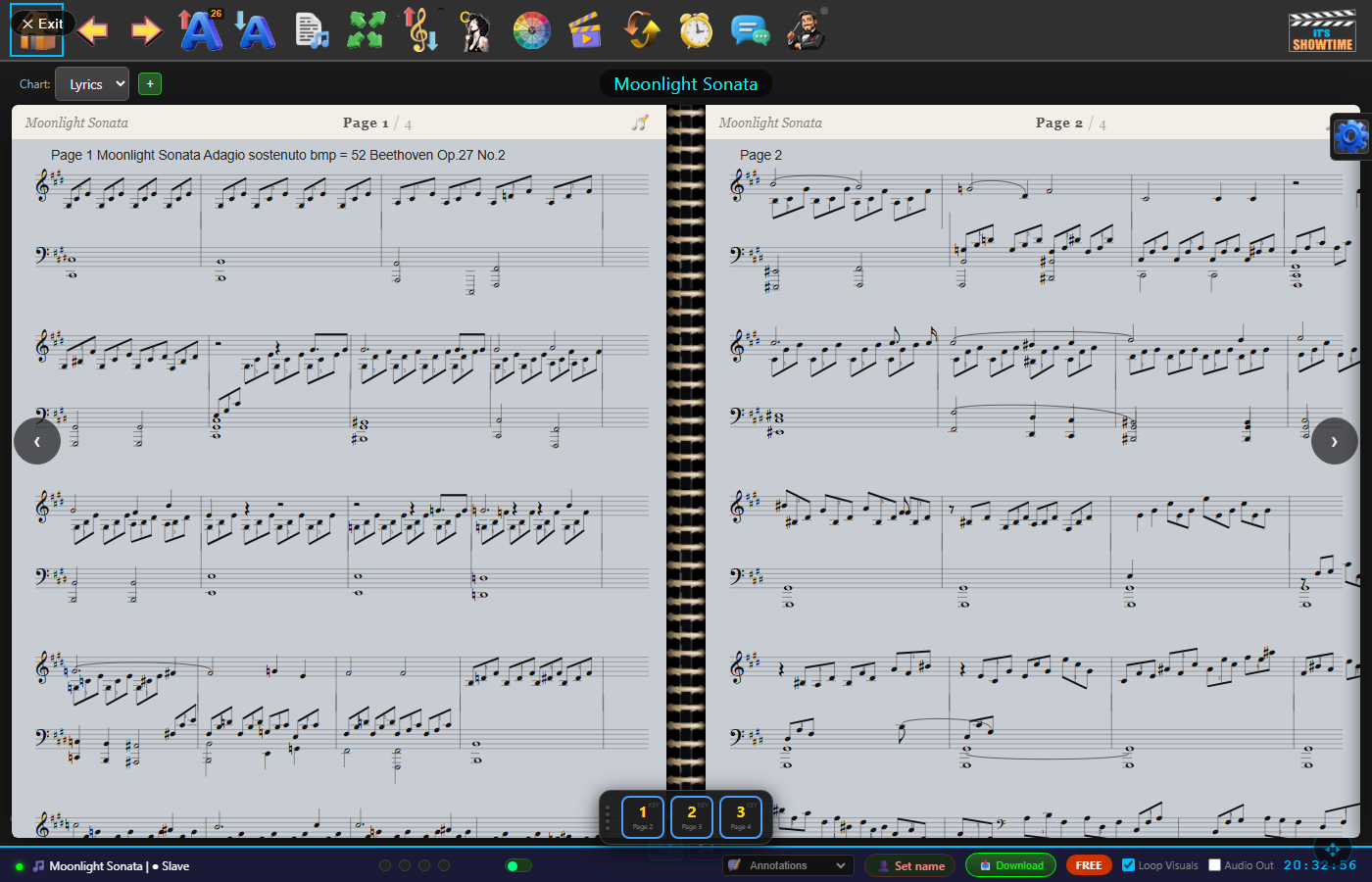
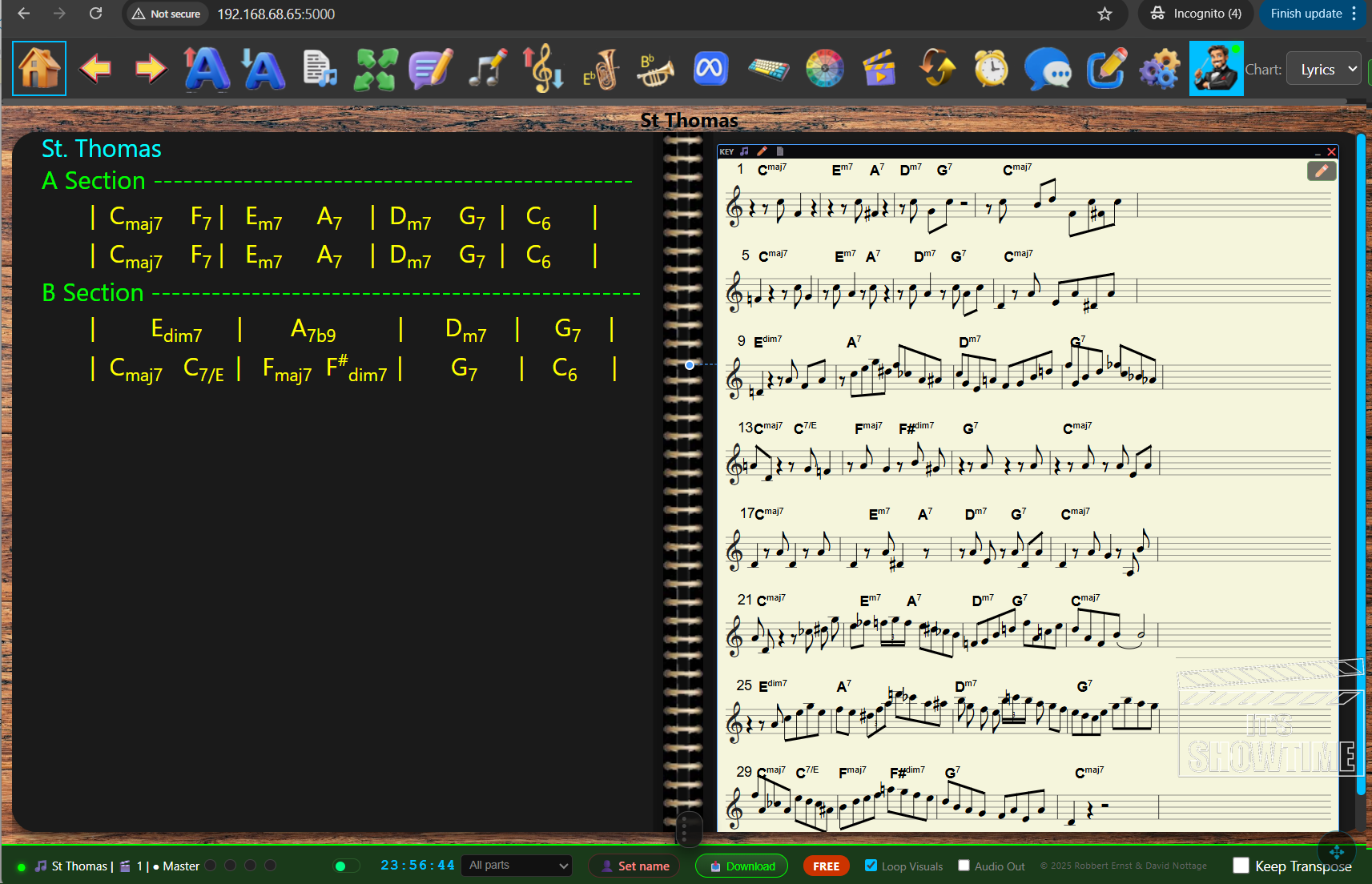
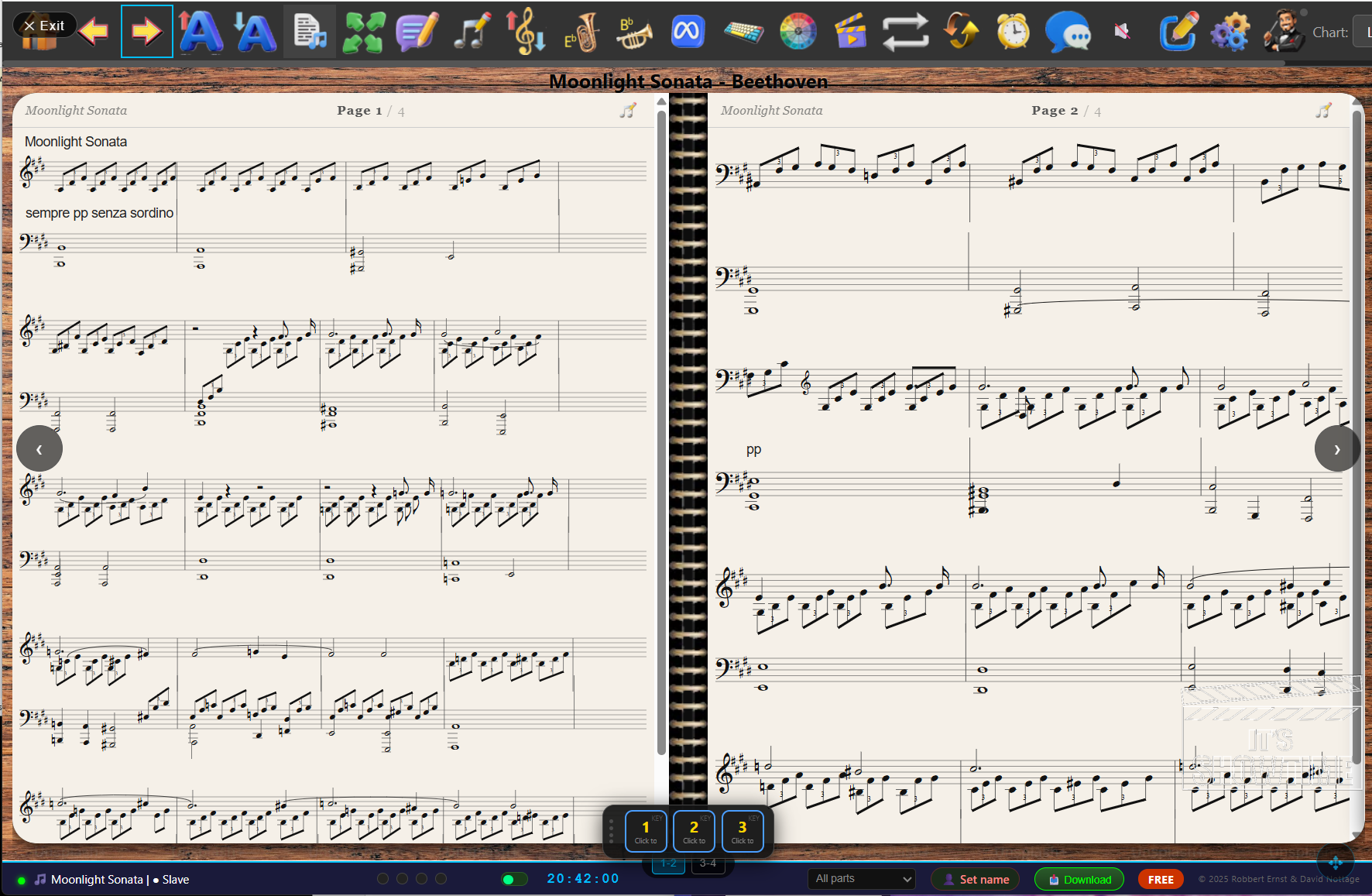
Hybrid view — MusicXML sheet music displayed side-by-side with the chord chart. Switch between simplified chart, full notation, or both with one tap.
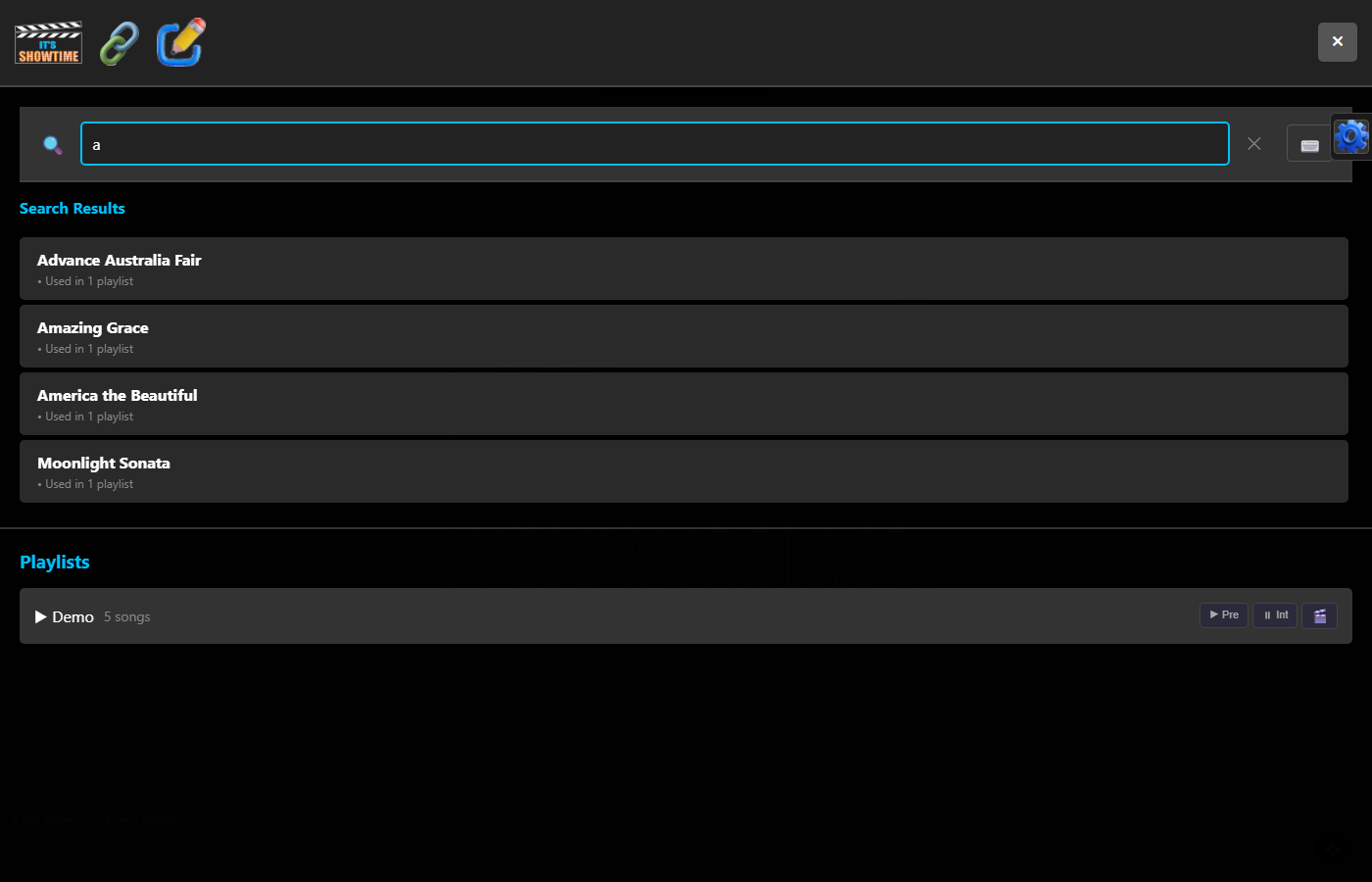
Song search — instant search across your entire library. Connect band members via QR code — no app install, just scan and open in any browser.
Annotations — add colour-coded sticky notes for each instrument: keys, bass, guitar, drums, vocals. Notes float over the chart and are only visible to the relevant player.
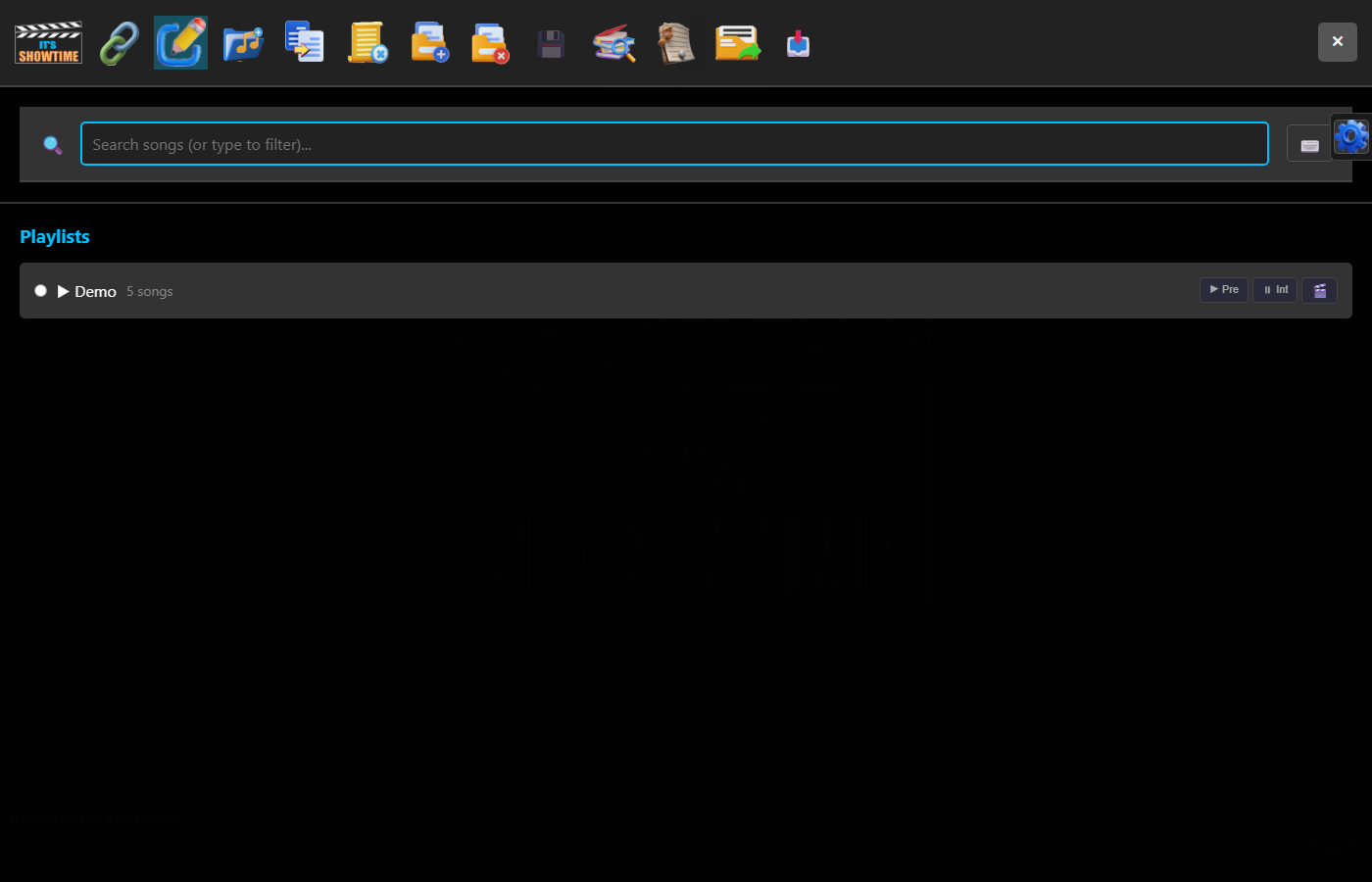
Setlist builder — drag and drop songs into setlists, reorder on the fly, and navigate the whole show in sequence. Build multiple setlists for different venues or nights.
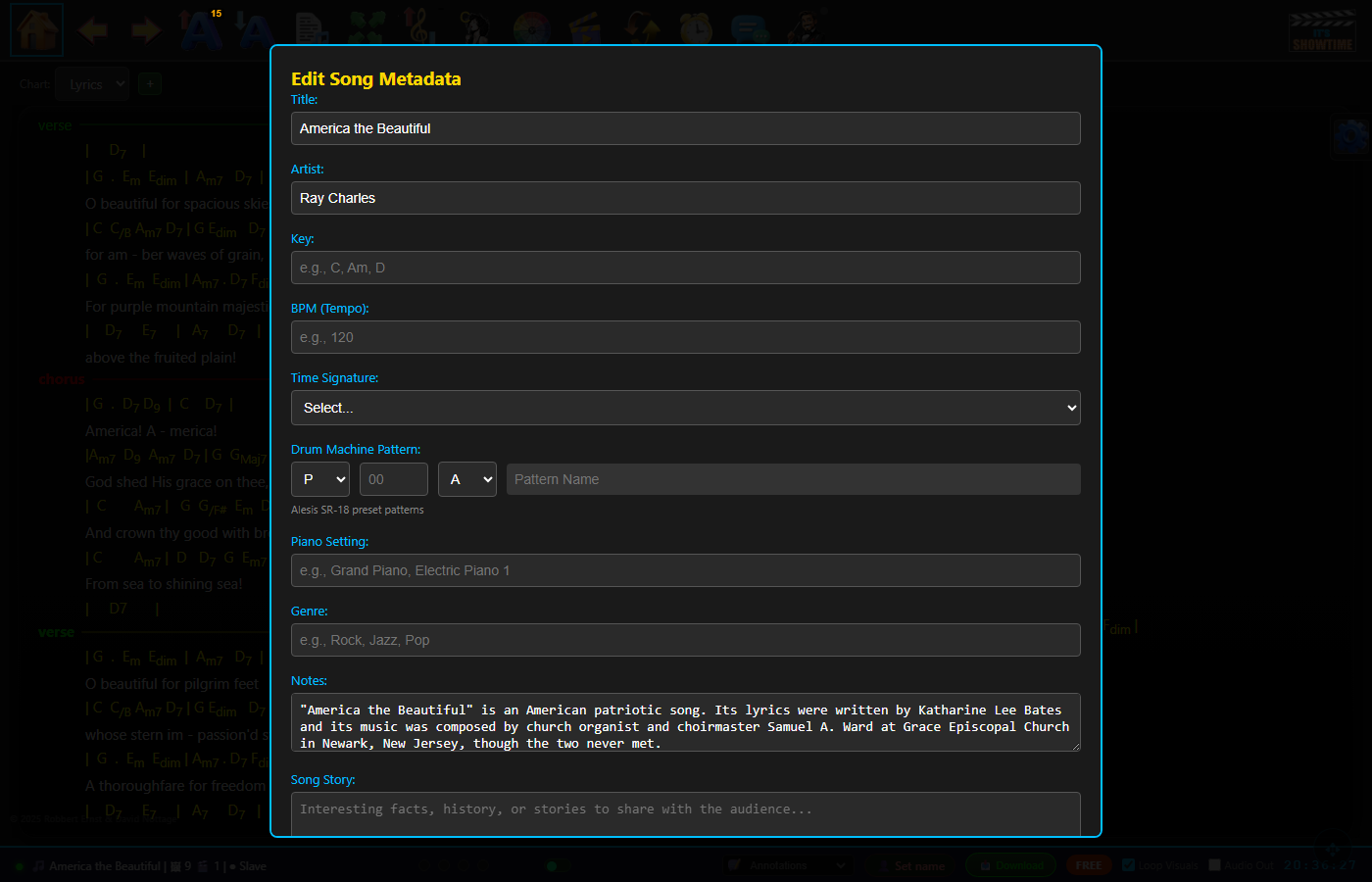
Song metadata — store key, BPM, time signature, drum machine pattern, piano setting, genre, and personal notes alongside every song.
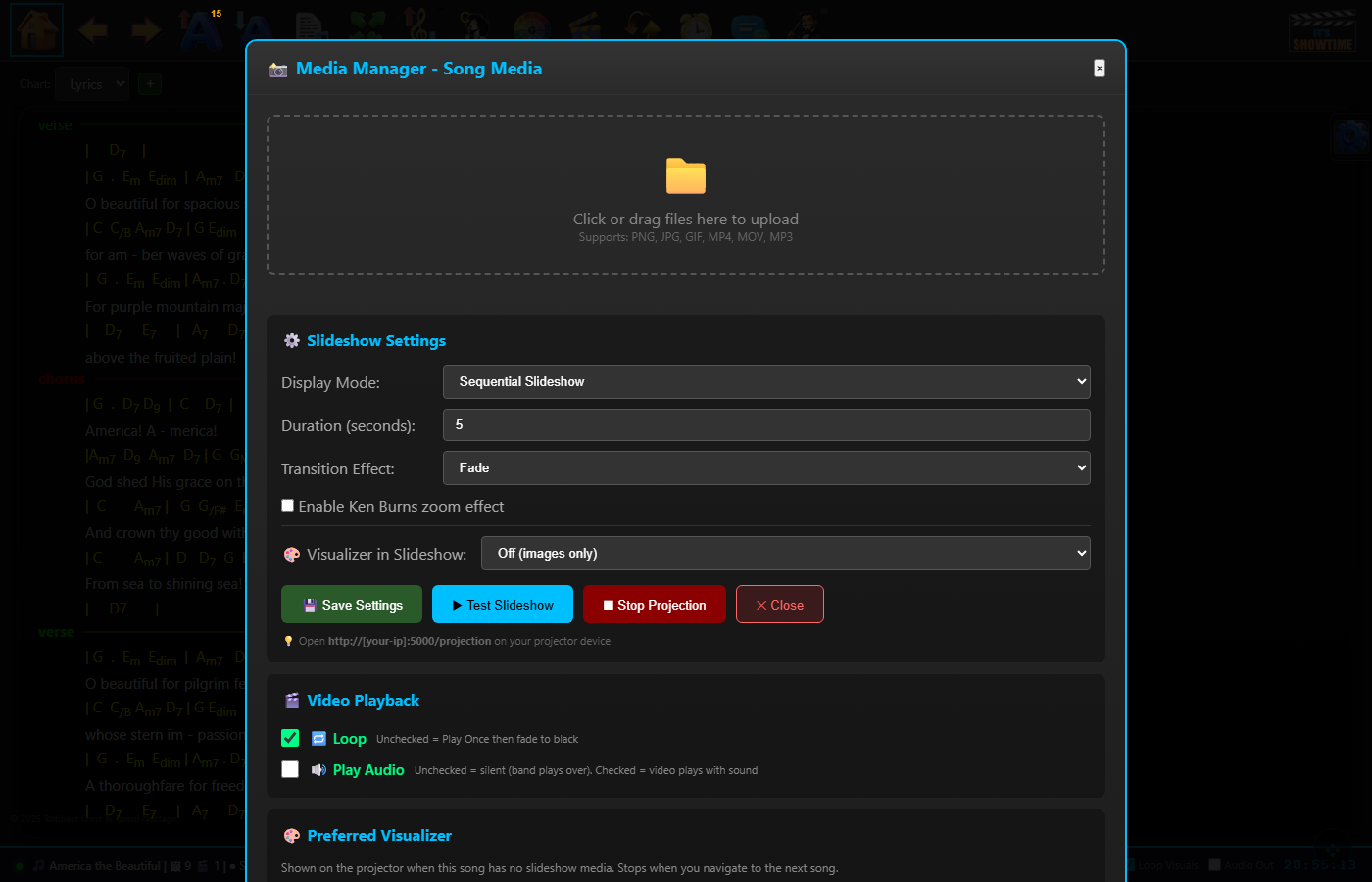
Media Manager — Slideshow — upload images for Pre-Show, Intermission, Post-Show or per-song projection. Set transition style, duration, and Ken Burns zoom effect.
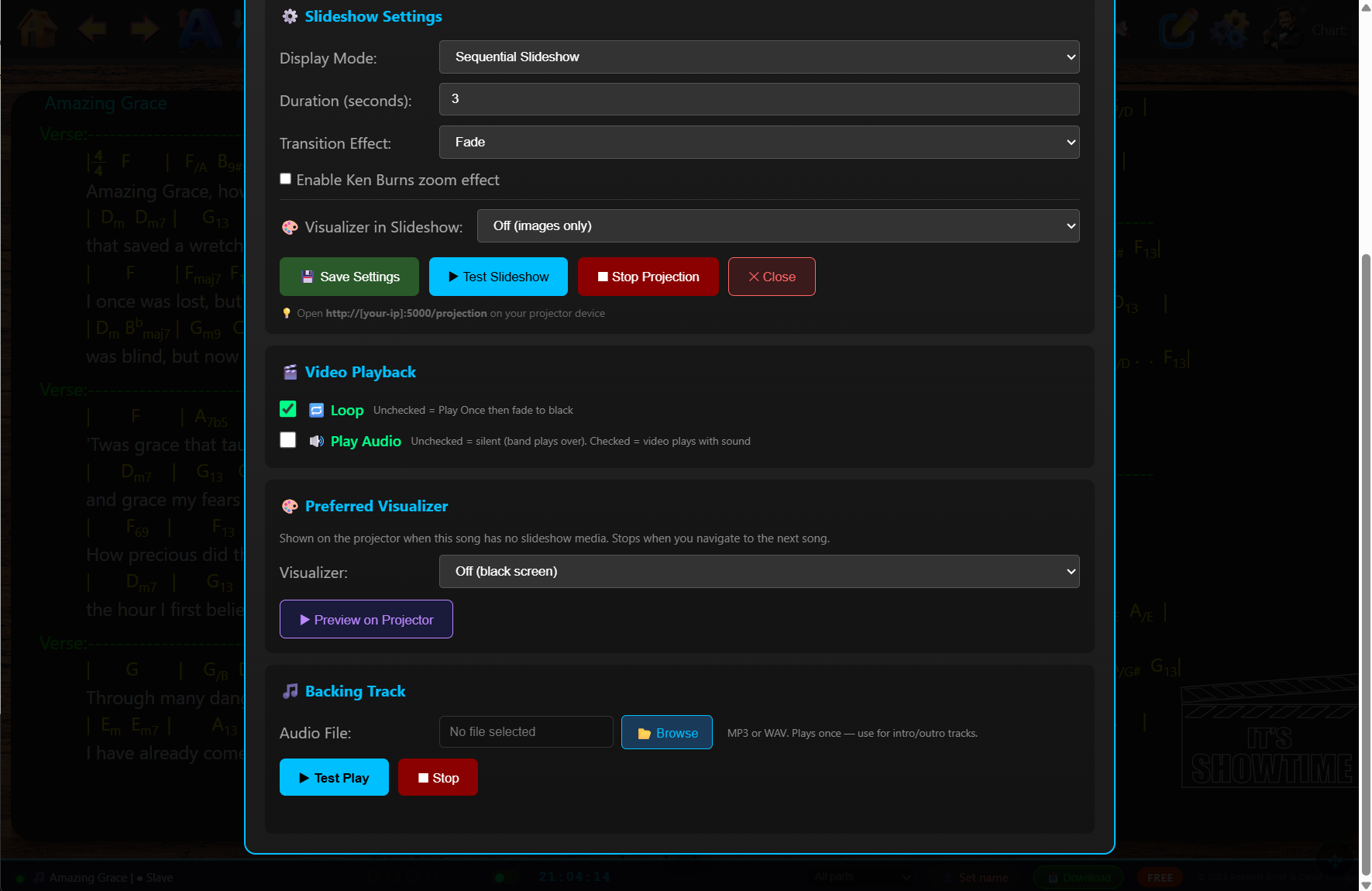
Visualiser & Backing Track — real-time visuals that pulse and throb to the beat of the music. Choose from kaleidoscope, fire, particle storm, starfield and more. Assign a backing track MP3 per song. The device with the PA claims audio output with one tap. Expanding significantly in future updates.
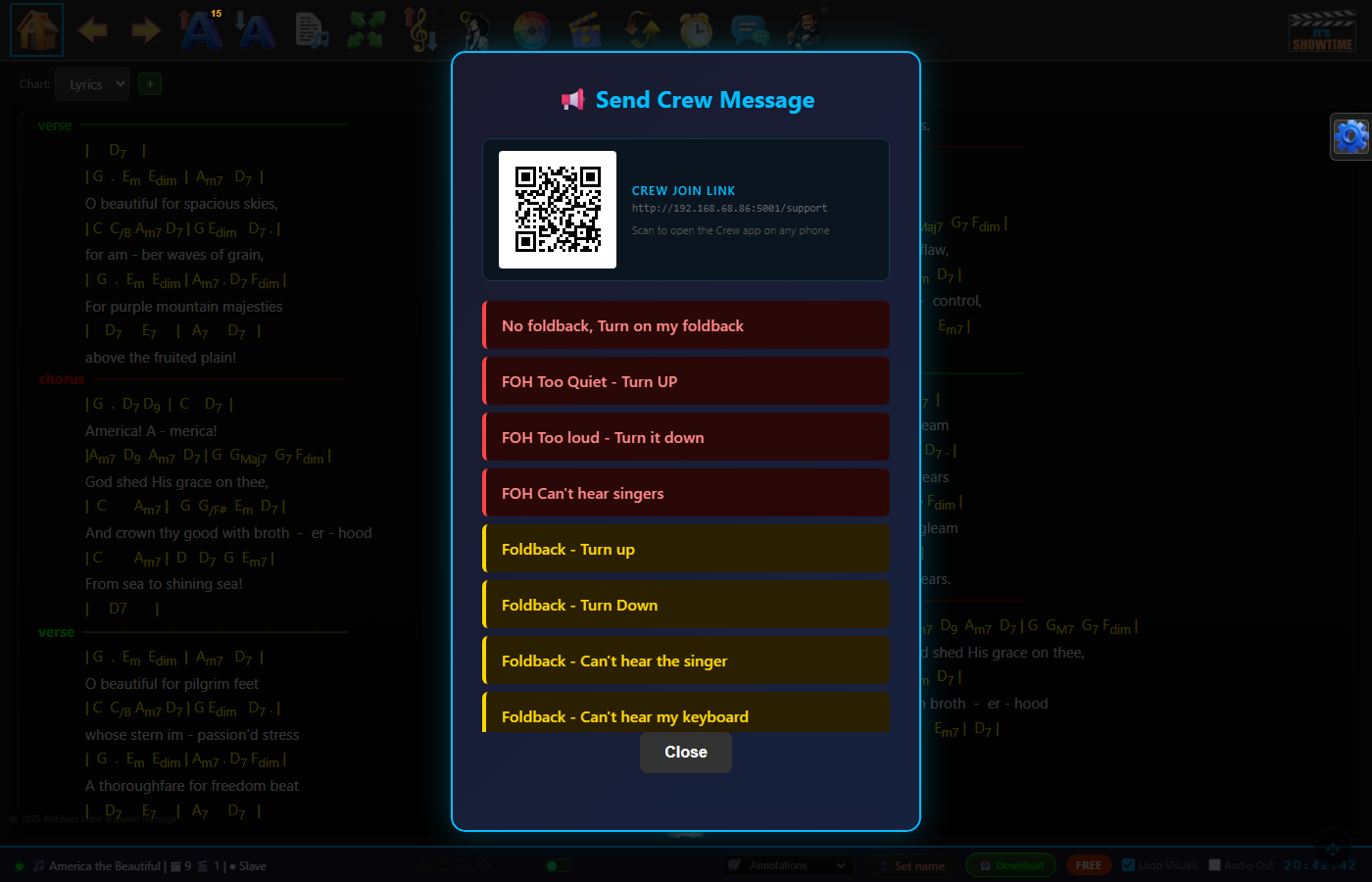
Crew messaging — send pre-defined colour-coded messages to your sound, lighting, and stage crew in real time. Crew members join from any phone by scanning a QR code.
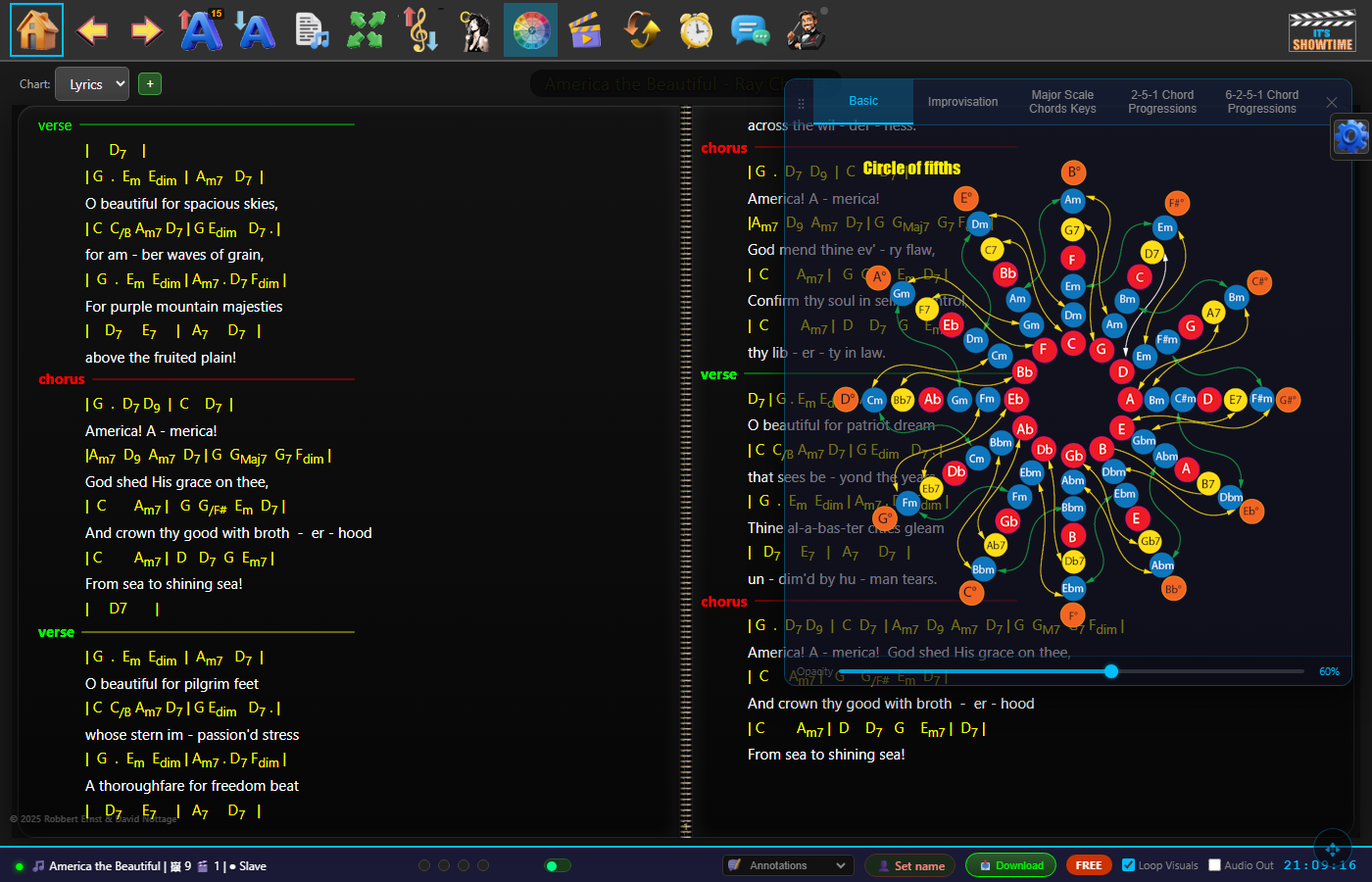
Circle of Keys — interactive music theory reference built in to the app. Instantly see related keys, modes, and chords for any key you're playing in.
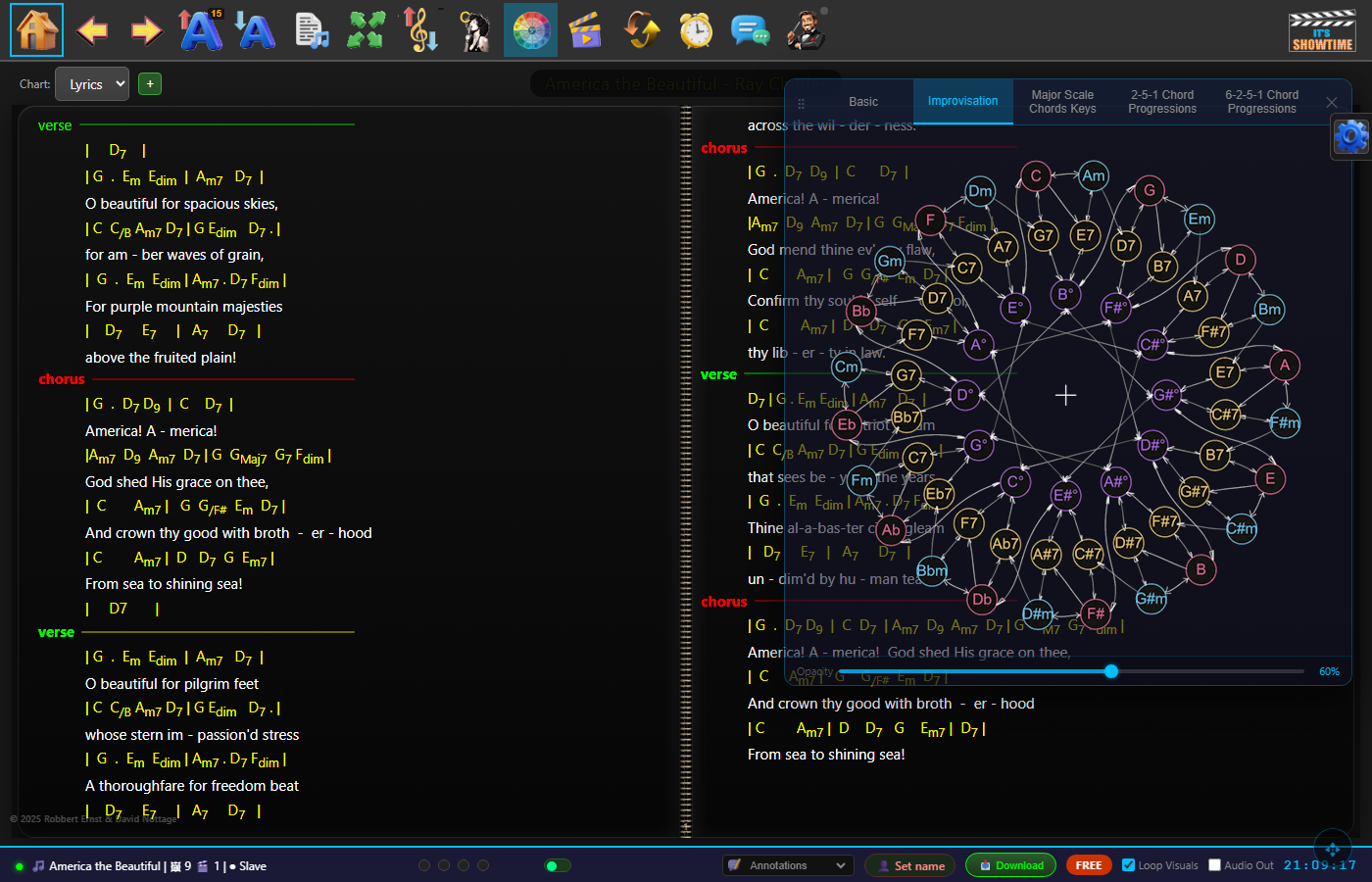
Improvisation guide — scales, modes, and soloing ideas for the current key, displayed as a popup reference panel during performance.
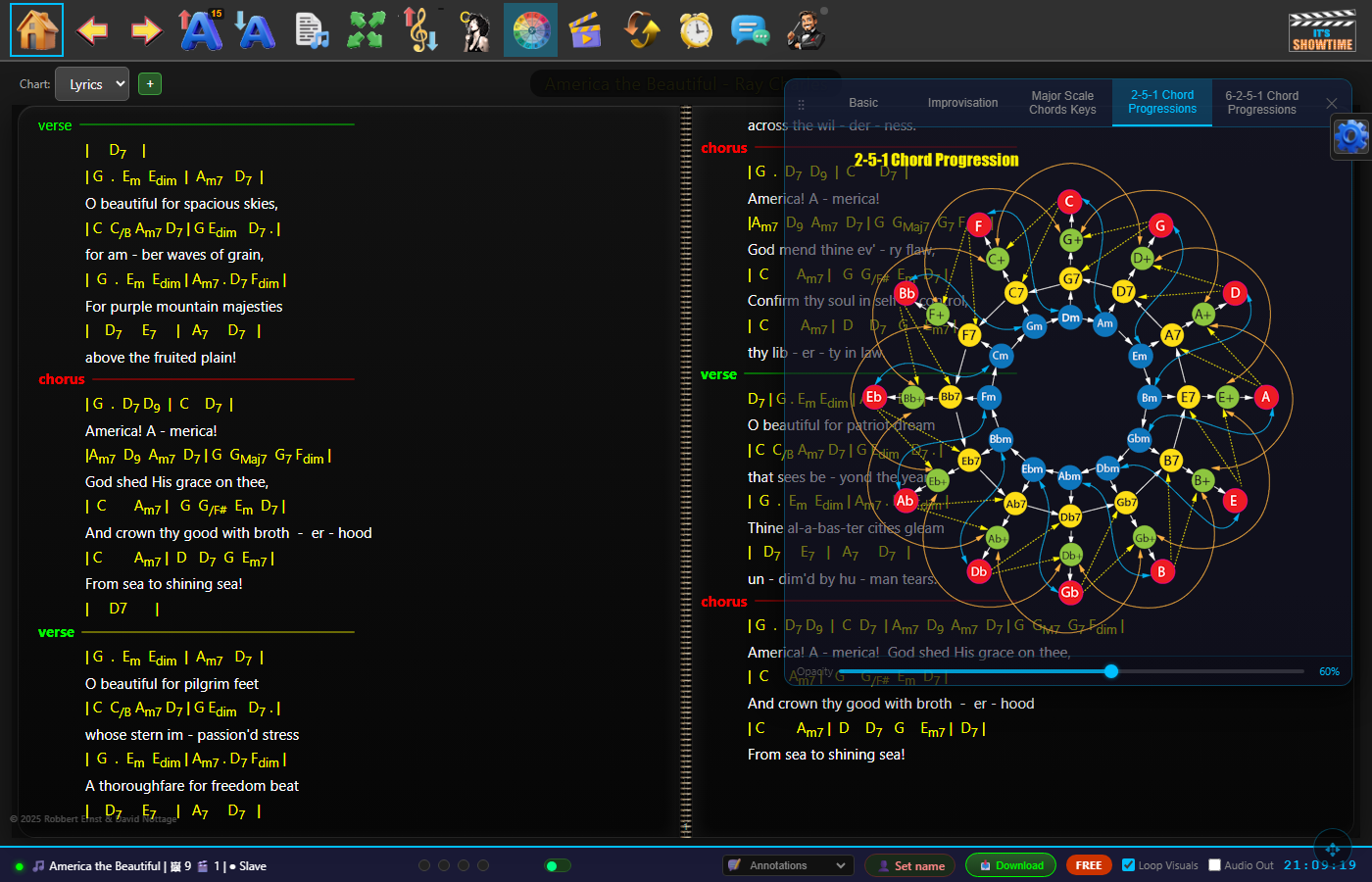
2-5-1 Progressions — instant reference for the most common jazz and pop chord progressions in every key, always a tap away during a performance.
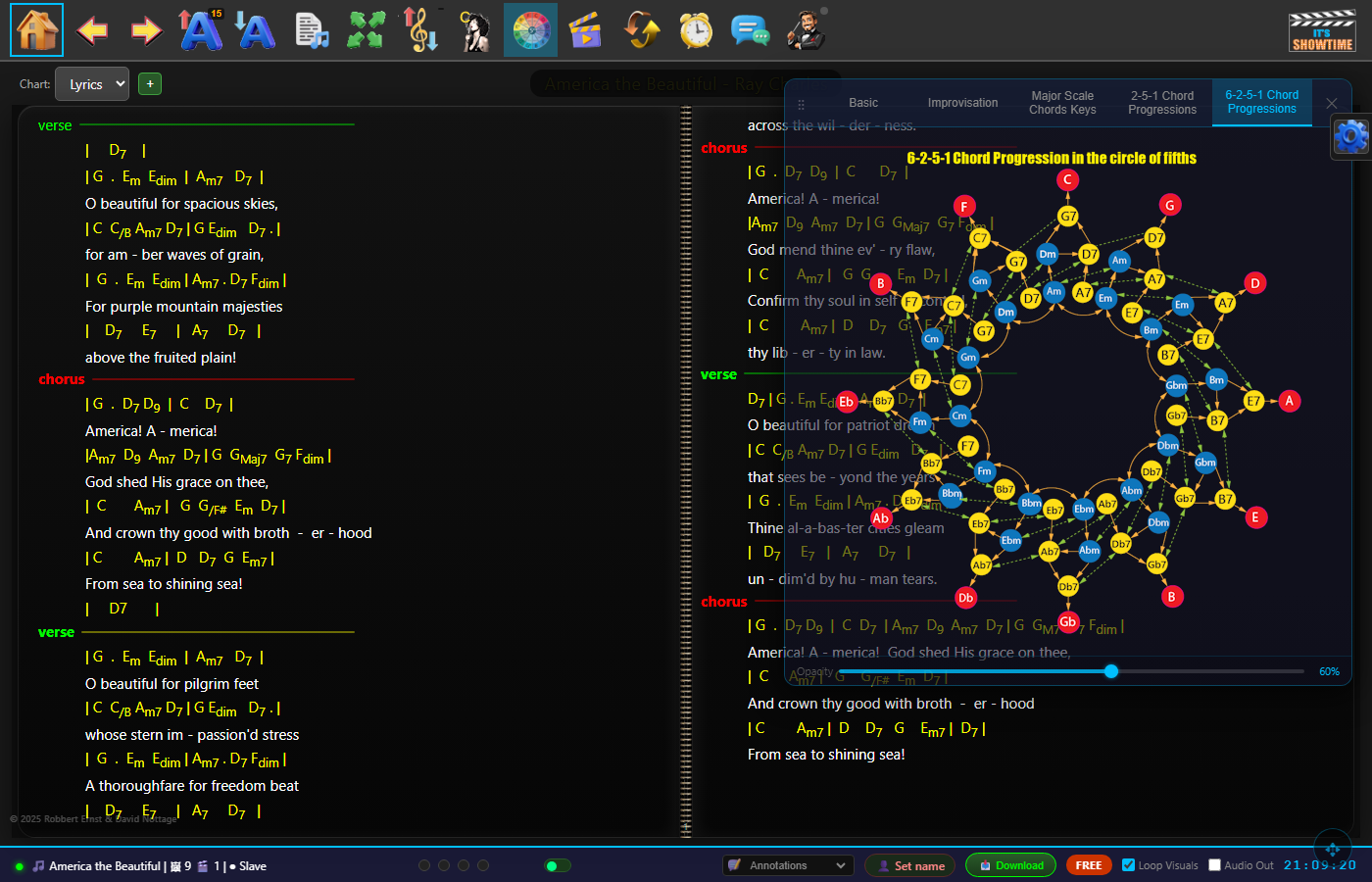
6-2-5-1 Improvisation — extended progression reference with scale and soloing suggestions for each chord, helping you stay musical through complex changes.
"Finally, software that understands what performers actually need. The master/slave sync alone has transformed our rehearsals and gigs."
""
""
The Free tier runs entirely in the cloud — sign up and start immediately, no download needed.
Paid licenses include the desktop app — Windows & macOS (Linux & Raspberry Pi too) for running It's Showtime as your own local server on stage.
The desktop app runs on Python + Flask locally — Windows, macOS, Linux or a Raspberry Pi — and your band connects from any browser via WiFi. No internet required on stage.
Database is file-based (SQLite) — store it in your OneDrive, Google Drive, or Dropbox for automatic backup and cross-device sync using your own cloud service.
It's Showtime runs a local web server on your main device (the Master — typically a laptop or Raspberry Pi). Other band members open a browser on their phone or tablet and type in your device's IP address. When you change songs, transpose, or turn the page, every connected screen updates instantly over your local WiFi network. No internet required, no accounts, no app installs.
The Master device (where you run It's Showtime) can be any Windows, Mac, or Linux machine — or a Raspberry Pi 5 for a compact, silent stage solution. Band members just need any device with a browser: phone, tablet, or laptop. For projection, connect any HDMI display or TV. A small WiFi router dedicated to the band is recommended for reliable sync at a venue.
No. It's Showtime runs entirely offline. You just need a local WiFi network for band members to connect to your Master device — even a cheap travel router or mobile hotspot works perfectly. No cloud dependency, no lag, no relying on the venue's WiFi.
You can paste directly from Word, import RTF files, or type and edit in the built-in editor. PDF fakebook pages can be added as chart images. MusicXML files display as full sheet music via OpenSheetMusicDisplay. The editor preserves your chord colours (yellow chords, cyan section headers, etc.) and existing formatting.
Band 4 ($99/yr, up to 4 players), Band 6 ($124/yr, up to 6 players) and Band 8 ($149/yr, up to 8) are the same plan — pick the one that fits your line-up. All cover everything a gigging band needs: unlimited songs, instant transpose, wireless master/slave sync, foot-pedal navigation, annotations, and — unlike most apps — the full projection suite: pre-show, intermission and post-show slideshows plus per-song video and images.
Band 12 · Pro ($499, up to 12 players) adds MusicXML sheet music and DMX stage lighting control, plus multiple projectors with live streaming/camera input and MIDI control (both coming soon), and includes 3 years of updates. (Running more than one band — separate libraries, setlists and invoices — is included on every paid licence.)
The free Band 2 tier runs in the cloud — nothing to install — and supports 2 devices so you can try master/slave sync, with up to 25 songs.
Every licence is perpetual: you're paying for a window of updates and priority support, not renting the software. No per-musician fees on any plan.
You keep It's Showtime — the desktop app doesn't lock you out and nothing is deleted. Your install keeps running at the version you have, and your songs and setlists stay yours (on your own machine or your cloud drive).
Every licence is perpetual; what your plan buys is a window of free updates and priority support (1 year on Band 4 & 8, 3 years on Band 12 · Pro). Let it lapse and you simply stay on your current version until you renew.
The one exception is the hosted Cloud (SaaS) version — because we run it for you it needs an active plan to keep running (and it's always on the latest version). We'll remind you a month before it lapses.
The Free (cloud) tier stores your data securely on our servers — accessible from any device, anywhere.
The paid Windows standalone app uses a local file-based database (SQLite) stored on your own machine. You own it completely. Point it at a folder inside your OneDrive, Google Drive, or Dropbox and your songs automatically back up and sync across your devices — no subscription to us required for storage.
Why file-based? Musicians know how to copy files. Your entire song library is a single file — copy it to a USB stick, drag it to a new laptop, or let your cloud drive handle it automatically. No "backup and restore" wizards, no export/import headaches. Just files.
This makes the standalone app ideal for no-internet gig situations — everything runs locally, your data never leaves your machine.
Upload images or videos to any playlist and tag them as Pre-Show, Intermission, or Post-Show. When you're ready, hit the Pre-Show button next to that playlist (from any connected device — your roadie can do it from their phone). The slides play on the projector automatically with your chosen transitions and timing. When the band starts, selecting the first song stops the pre-show instantly.
After purchase you'll receive a license key by email. Enter it in the It's Showtime settings and it activates immediately. Each license is tied to a machine ID for security, but you can transfer it if you change computers.
A professional karaoke system built for pubs, hotels, clubs and RSLs. CDG+MP3 playback, patron song requests via QR code, queue management, pitch shifting, and a dedicated host interface — all on your own hardware, no ongoing rental fees.
Register your interest and be first to know when it launches.
New features, release announcements, and tips for gigging musicians. No spam — just useful updates when something happens.